Pam LogoPAM

Product

New updates and improvements to Pam.

View Interactive Demo
Aug 13, 2026
August 13, 2026

Calendar Reconnects, Meeting Lookup, and Claude Code Memory

This update makes it easier to keep calendars connected, lets integrated apps pull specific meetings by name, and adds Claude Code as a new memory source.

Calendar Connection Flow

Connecting and reconnecting calendars is now easier, with clear status indicators showing whether a calendar is connected or disconnected. If a calendar drops offline, a banner lets you reconnect it in a single click.

Faster Sign-Up from the Website

Starting sign-up from the marketing site now carries your email address over automatically, so you don't have to retype it.

Meeting Lookup for Connected Apps

Third-party apps connected to Pam's memory, like Cursor and Claude Code, can now find and pull a specific meeting or call by name directly, instead of relying only on general search.

Claude Code as a Memory Source

Claude Code now shows up as a connected memory source in your integrations dashboard, with its own icon, so you can see at a glance that your coding sessions are feeding your memory.

Improvements

  • TranscriptsSpeaker labels in meeting transcripts are now more consistent and accurate.
  • SecurityApplied patches for several dependency vulnerabilities (Next.js and related libraries) to keep the app secure.

Fixes

  • MobileFixed an issue where offline recordings on some iOS devices were cut short and saved as roughly one minute long regardless of the actual call length.
  • MemoryFixed edge cases that could cause part of a memory build to silently fail or get skipped, so your memory stays complete and up to date.
Jul 31, 2026
July 31, 2026

Task Calendar View and Self-Serve Billing

This update adds a calendar view for tasks and gives you full self-serve control over billing, data privacy, and account deletion.

Calendar Reliability

Pam now detects when a connected calendar disconnects, for example after a revoked permission, and lets you know so you can reconnect it instead of silently going stale.

Billing & Account Management

A new Billing tab in settings shows your plan and billing history, and lets you manage your subscription.

A new Data Privacy tab lets you see what Pam remembers about you and erase your memory data on demand.

Account deletion is now self-serve from settings, with a clear explanation of what data is removed.

Tasks Workspace

Tasks now have a calendar view, with tasks grouped by the meeting they came from. Transcript and speaker labeling on meeting review pages are also clearer and more accurate.

Improvements

  • SettingsYou can now choose between 12-hour and 24-hour time display in your account settings.
  • MemoryPam now pulls memory from every connected email account, not just the first one you connected.
  • MemoryMore accurate memory extraction — Pam records only what was explicitly said and avoids inferring facts you didn't state.
  • RecordingsImproved transcription accuracy and speaker separation for locally recorded meetings.
  • OnboardingCalendar and Notetaker connection steps added to onboarding, and launch pricing with discount codes is now available at checkout.

Fixes

  • CalendarFixed an issue where the same calendar email couldn't be linked by more than one Pam account.
Jun 30, 2026
June 30, 2026

Offline Recordings, Meeting Tasks, and Memory Sync Controls

This update adds local meeting recording, automatic task extraction from meetings, and finer control over how your memory sources sync.

Offline Meeting Recordings

You can now record meetings locally, using your microphone or internal audio, directly in the browser. Recordings upload and process automatically, so you don't need a separate recorder.

Meeting Tasks

Pam now extracts and tracks action items and follow-ups from your meetings automatically, so nothing discussed gets lost.

Memory Sync Controls

You can now pause and resume memory syncing for any connected source at any time. Newly connected sources also sync just what changed instead of doing a full re-scan, so connecting a new account is faster.

Billing History

Your billing history is now viewable directly from account settings.

Developer Memory Tools

The Memory MCP developer dashboard has been reorganized into dedicated pages for easier setup and access management, and now includes a Playground for testing retrieval and generating answers directly from your memory.

Improvements

  • AuthAdded a loading state while your email confirmation is processing, plus continued improvements to the sign-in/sign-up flow.
  • MemoryImproved accuracy of Pam's memory search, with a fallback lookup method for cases where the primary search comes back empty.
  • SecurityMultiple dependency vulnerabilities patched across the app.

Fixes

  • ChatFixed several issues causing dropped or stuck responses during longer chat conversations.
  • MemoryFixed memory sync leaving a half-finished update when something went wrong — sync now stops cleanly and skips extra work when there's nothing new to process.
May 31, 2026
May 31, 2026

Outlook as a Memory Source and Faster, More Reliable Sync

This update adds Outlook as a memory source and makes memory syncing faster and more resilient to failures.

Outlook as a Memory Source

You can now connect Outlook the same way you connect Gmail — Pam reads your Outlook email across all folders, not just the inbox, to build and keep your memory up to date.

Improvements

  • SyncingSync processing is now parallelized, so memory updates complete faster.
  • SyncingTuned safeguards so a sync that's still legitimately running is no longer mistakenly flagged as "stuck" and restarted.
  • RecordingsMeeting bot scheduling, recording sync, and edge-case failures (adhoc meetings, duplicate webhook deliveries, already-deleted bots) are now handled more gracefully, so fewer recordings silently fail.
  • SecurityMultiple dependency vulnerabilities were patched across the platform (authentication library, HTTP client, template engine, and related packages), closing several medium/high-severity CVEs.

Fixes

  • MemoryFixed a class of silent failures where parallel email/document processing could drop or corrupt data during a sync.
  • MemoryFixed memory syncs for the same account racing each other — connecting a new integration or triggering multiple updates in a row now runs safely in sequence instead of duplicating work.
May 1, 2026
May 1, 2026

Transparent Context and Faster Onboarding

This update focuses on making Pam's reasoning visible and significantly reducing the time required to set up your workspace and memory.

Guided Onboarding

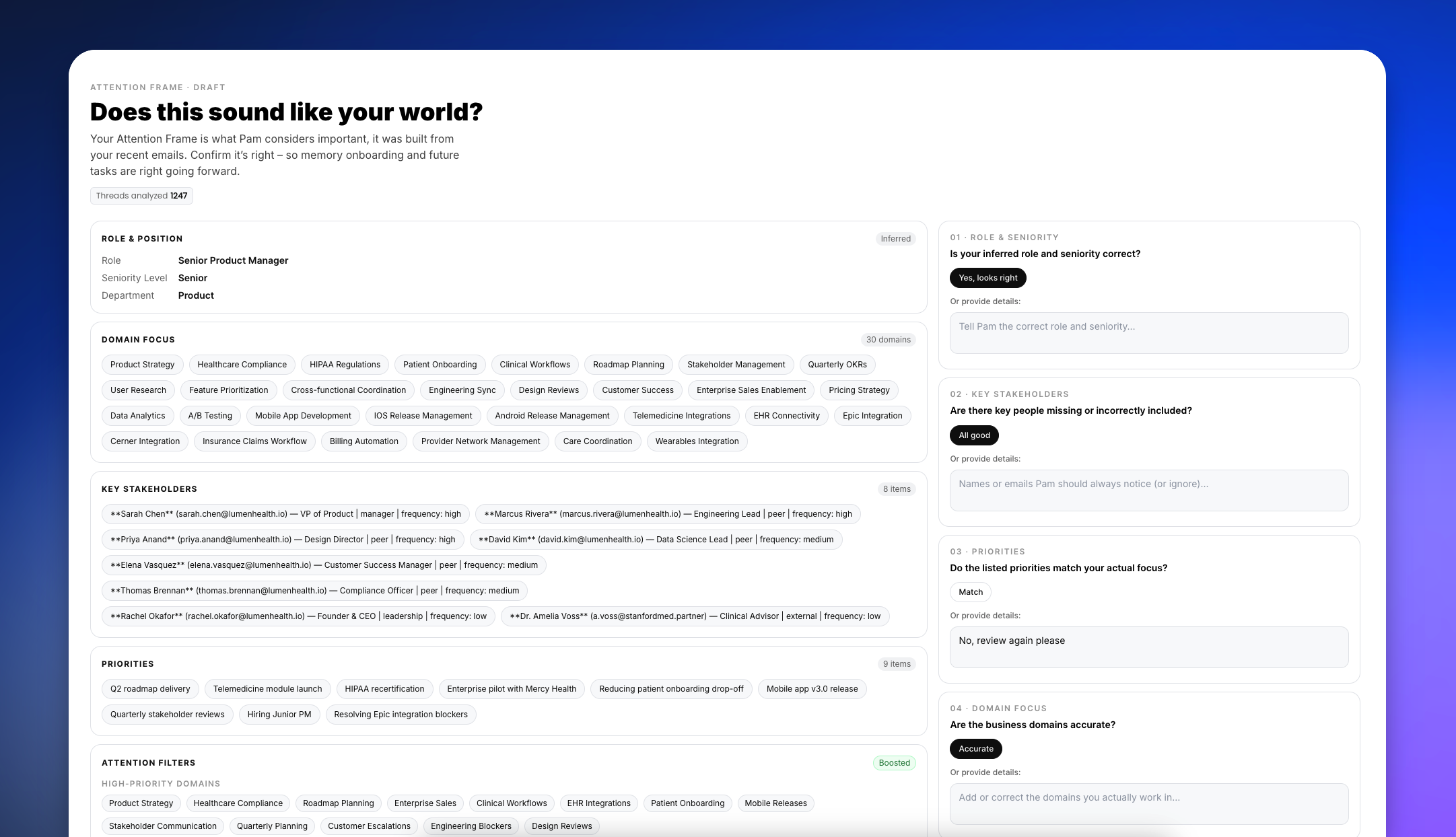
We introduced a new onboarding experience for first-time users. This step-by-step progression guides you through plan selection and initial email connection. A new "Attention Frame" review step allows you to verify and configure your memory setup immediately, ensuring Pam has the right context from the start.

Attention Frame review interface showing inferred role, domain focus, key stakeholders, and priorities with verification prompts

Visible Actions and Memory Context


You now have full visibility into how Pam generates responses. When an integration is used, Pam displays the specific icon and action performed directly in the chat. The thinking panel now lists the exact memory sources and tools used to formulate an answer, with a sidebar showing specific files and data points that contributed context to the conversation.

Visible Actions and Memory Context

Performance and Self-Healing Integrations

We optimized the generation of the "Attention Frame" (your email-based context), reducing the processing time from several minutes to approximately 60 seconds. To improve reliability, we implemented self-healing OAuth sessions. If an integration connection expires silently, Pam will now automatically reconnect it without requiring you to re-authenticate.

Improvements

  • MemoryThe integrations page now displays active memory sources and their last sync timestamps.
  • DraftsMessage drafts are now saved per conversation and persist across page reloads and tab switches.
  • TranscriptsMeeting transcripts can now be downloaded as text files directly from the recording details page.
  • IntegrationsImproved the reliability of fetching sent emails to ensure consistency across different label structures.
  • SecurityAdded forgot password and change password flows to the login screen and account settings.
Apr 14, 2026
April 14, 2026

Chat Workflows, File Parsing, and Personal Instructions

File Parsing

Pam now reads and processes file attachments, such as PDFs and text documents, immediately upon upload. The content is instantly available to the assistant without any extra processing steps.

Thinking Process

You can now also stop a streaming response midway to pivot the conversation without waiting. To provide better visibility into Pam's logic, the thinking process is now displayed in a draggable sidebar panel, and this thinking history is preserved when you leave and return to a session.

Chat-Driven Workflows

You can now build, view, and manage workflows entirely through chat messages. For active workflow runs, you can inspect workflow details and adjust configurations directly within the conversation interface, eliminating the need to navigate to a separate dashboard.

Personalization and Context

You can now set personal instructions in your profile to customize Pam's default communication style. Additionally, Pam automatically captures your local timezone at login to ensure all time-sensitive context and scheduling are perfectly aligned with your location.

Improvements

  • MemoryUpgraded the memory architecture to ensure better cross-file consistency, faster response delivery, and more accurate retrieval.
  • ChatAdded state preservation for the thinking process sidebar across sessions.
Mar 29, 2026
March 29, 2026

Meeting Memory, Autonomous Workflows, and Dynamic Sync

This update allows Pam to extract high-fidelity knowledge from your meetings, ensures complex workflows are completed without manual intervention, and keeps your connected documents synced.

Meeting Transcripts as Memory

Pam now ingests meeting transcripts directly into its memory system. To ensure accurate recall, transcripts go through a two-pass extraction. First, a general read captures the broad context. Second, a meeting-specific lens (e.g., standup, customer call, planning) extracts relevant decisions, facts, and action items.

Meeting transcripts flowing into Pam's memory system

Autonomous Workflow Completion

You no longer need to manually re-trigger stalled automations. If a workflow stops before completing all planned steps, Pam will automatically continue the sequence by running up to three continuation rounds until the full task list is executed.

Dynamic Memory Sync & Adaptive Learning

Memory now updates incrementally. If you edit a connected Google Drive file, Notion page, or past conversation, Pam detects the change and re-processes only the updated content, bypassing the need for a full system re-sync.

Additionally, Pam's self-reflection system now uses an adaptive algorithm to select only the most relevant lessons learned before generating a response, thereby drastically reducing noise and improving accuracy.

Improvements

  • AnalysisUpgraded deep analysis to handle large knowledge bases without hitting input limits. Incremental plans are now saved to preserve progress if interrupted.
  • BillingImplemented an automated Slack alert system for the internal team when a user exhausts their credits.

Fixes

  • IntegrationsFixed an issue causing OAuth disconnections for Google and Outlook during in-chat flows.
  • ChatExpanded file support to resolve rejections of certain formats, including .doc.
  • ChatFixed a bug causing the chat interface to go blank after a stream interruption.
  • ChatResolved a crash triggered when copying a chat message.
  • UIFixed file uploads displaying a skeleton animation instead of the correct image thumbnail.
  • MobileFixed workflow layouts breaking on smaller screens.
  • MobileResolved an issue preventing Pam from running in the background on iOS.
Mar 15, 2026
March 15, 2026

Advanced Meeting Capture and 10x Faster Transcripts

This update brings a more powerful Notetaker with fallback summaries, instant transcript loading, and smarter self-improvement architecture.

Advanced Meeting Capture

We have upgraded the Notetaker to ensure you never lose meeting context. If the bot is rejected or fails to join a call, Pam now automatically generates a fallback summary. You also have finer control over attendance: you can toggle the Notetaker on or off for specific recurring events, manually deploy it to past or ad hoc meetings, or invite it by simply pasting a meeting link, no calendar integration required.

The meeting detail view has also been updated to include a dedicated transcript tab and direct video downloads.

File Support in Chat

10x Faster Transcripts

Transcript access is now instantaneous. We optimized the loading infrastructure so that large transcripts, which previously took up to 32 seconds to process, now load in under a second. You can also download transcripts directly to your local drive from the meeting detail view.

Contextual Self-Improvement

Pam's self-improvement architecture has been overhauled. The system now learns from the complete context of your conversations rather than isolated prompts, resulting in more accurate and highly relevant responses over time.

Improvements

  • IntegrationsCalendar accounts can now be unlinked directly from the settings menu.
  • IntegrationsIntegration account labels can now be renamed to match your internal naming conventions.
  • IntegrationsAdded a demo mode to integration connect buttons to support guided onboarding flows.
  • SyncingEmail synchronization is significantly more robust. Background failures that previously went undetected are now automatically caught and retried.

Fixes

  • IntegrationsResolved multiple stability issues that caused erratic behavior for users managing many connected accounts.
Mar 5, 2026
March 5, 2026

Smarter Memory, Slack Integration & Advanced Notetaker

This update brings a more intelligent memory system, a new Slack integration, faster answers through smart retrieval, and a significantly more powerful Notetaker.

Smarter Memory & Slack Integration

Pam's memory system now processes information more intelligently. We introduced a conflict resolution flow that deduplicates information and focuses exclusively on newly discovered facts, preventing redundant processing.

You can also now connect Slack as a new memory source, allowing Pam to learn from your team's conversations and apply that context to future tasks.

Slack connected to Pam via integration

Smart Retrieval & Faster Answers

Pam now analyzes your prompt to determine if a deep knowledge tree retrieval is necessary before generating an answer. If a query can be answered directly without searching your connected data, it bypasses the retrieval step, resulting in significantly faster response times.

We also laid the groundwork for feature flags, allowing us to roll out capabilities like this more seamlessly.

Smart Retrieval & Faster Answers gif

Advanced Notetaker Capabilities

The Notetaker now generates high-quality meeting summaries.

You gain more control over your meetings by manually inviting the bot via a meeting URL.

Pam Calendar interface showing Add Pam directly modal for connecting to meetings

Improvements

  • WorkflowsAdded a new "timed out" status for workflow runs to reflect and track stalled automations.
  • IntegrationsImplemented a new, streamlined system flow for tool approvals.
  • UIUpgraded account labeling and sorting to keep multi-account integrations organized.

Fixes

  • AuthPrevented an issue where users could log into the same account redundantly.
  • CopyCorrected a minor grammatical error in system exception messages.
Feb 13, 2026
February 13, 2026

File Uploads, Multi-Account Integrations, and a Better Notetaker

This update brings full file support to your conversations, unlocks multi-account management for integrations, and significantly improves how Pam organizes your meetings.

File Support in Chat

You can now share and collaborate on documents directly within Pam. We added drag-and-drop file support to the chat interface, allowing you to upload up to 5 files (up to 20MB each) per message.

To keep your workflow seamless, we also built native viewers directly into the chat. You can now view large images, read PDFs, and inspect text documents without leaving the conversation. All files are securely stored in your chat history for easy access and downloading later.

File Support in Chat

Multi-Account Integrations

Managing multiple storefronts or social profiles is now much easier. You can now connect multiple accounts to a single integration — such as linking several Shopify stores or multiple Instagram profiles.

A new dedicated "Accounts" block lets you view all connected profiles, set a default account for Pam to use, and unlink individual accounts as needed. Alongside this update, we are also rolling out new integrations for Instagram, Facebook, TikTok, Shopify, and WhatsApp.

Multi-Account Integrations

Notetaker Upgrades

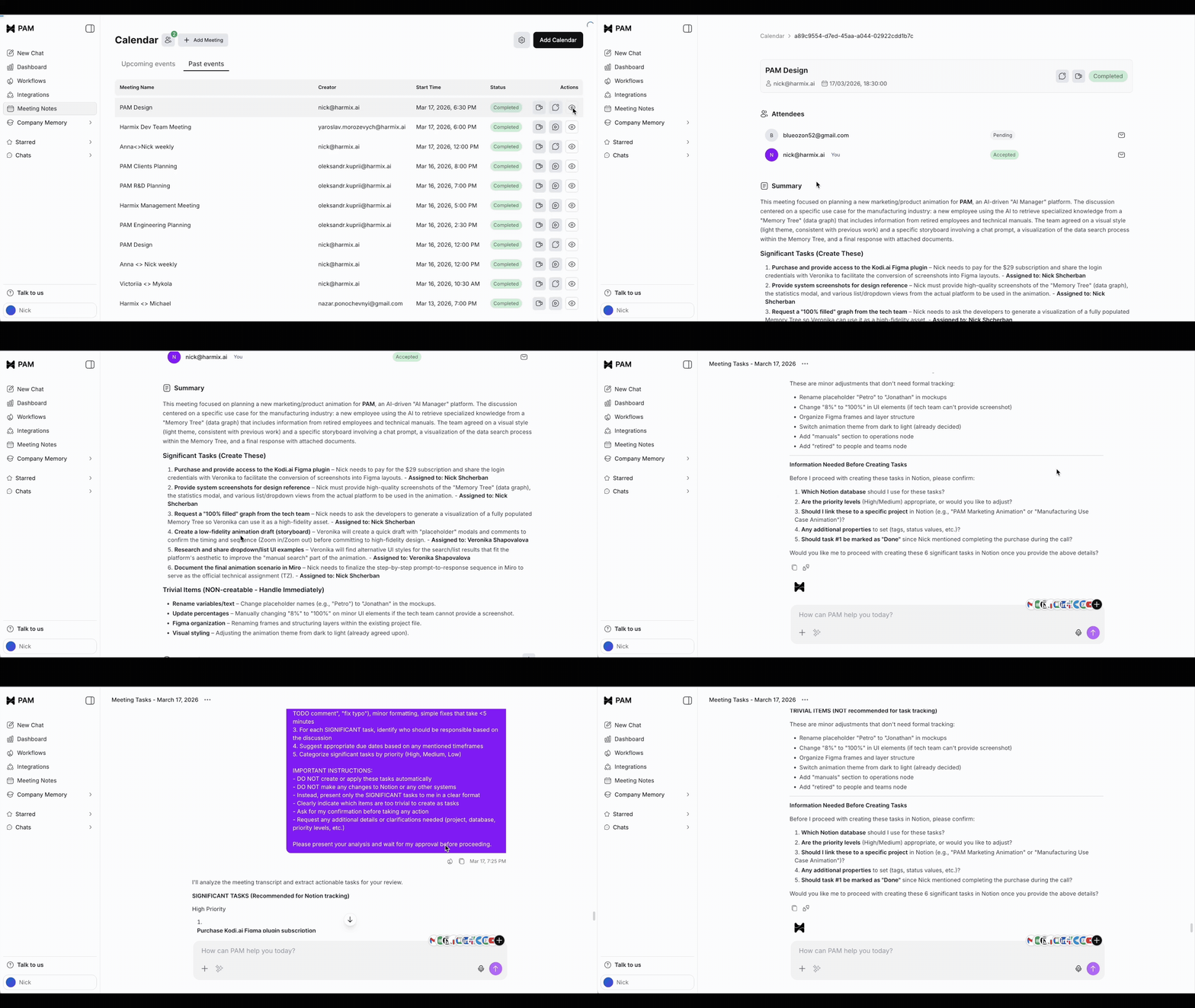
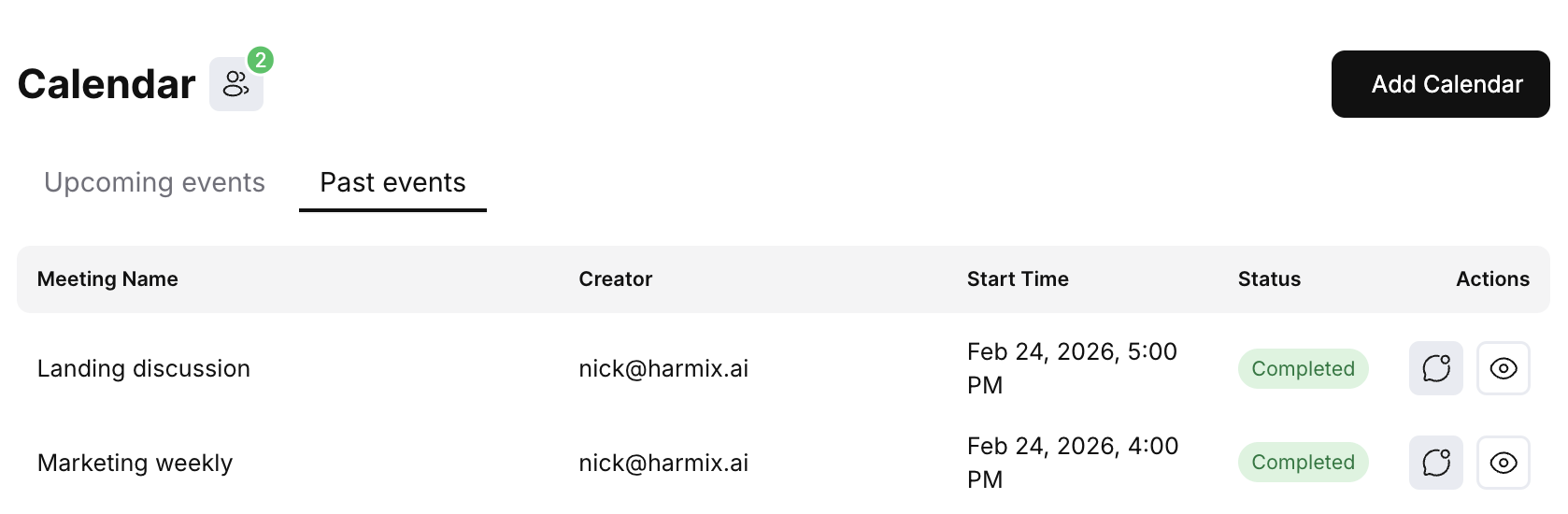
We redesigned the Notetaker experience to give you better visibility into your schedule. You can now connect multiple Google Calendar accounts and filter your meetings by specific calendars. The interface also now logically groups your events, splitting them into "Upcoming" and "Past" meetings to make browsing your schedule much faster.

Calendar interface showing Past events tab with meetings listed including Landing discussion and Marketing weekly, with status and action columns

Improvements

  • UXChat names are now displayed in your browser tab title, making it easier to navigate between multiple open conversations.
  • UXImproved project filtering with support for advanced query parameters.
  • UXUpdated chat loading skeletons to provide a smoother visual experience when opening threads.
  • PerformanceUpgraded the frontend infrastructure to ensure faster and more reliable performance across the app.
Feb 5, 2026
February 5, 2026

Voice & Chat Tools

Voice & Chat Tools

You can now speak directly to Pam. We've added support for voice messages, enabling faster, more natural input.

We also introduced an AI Prompt Enhance. If you're stuck on how to phrase a request, Pam can now optimize your prompt for better results. Additionally, you can stop Pam's response mid-stream if you need to pivot the conversation.

Voice & Chat Tools - Voice message input and response

Workflow Drafts & Templates

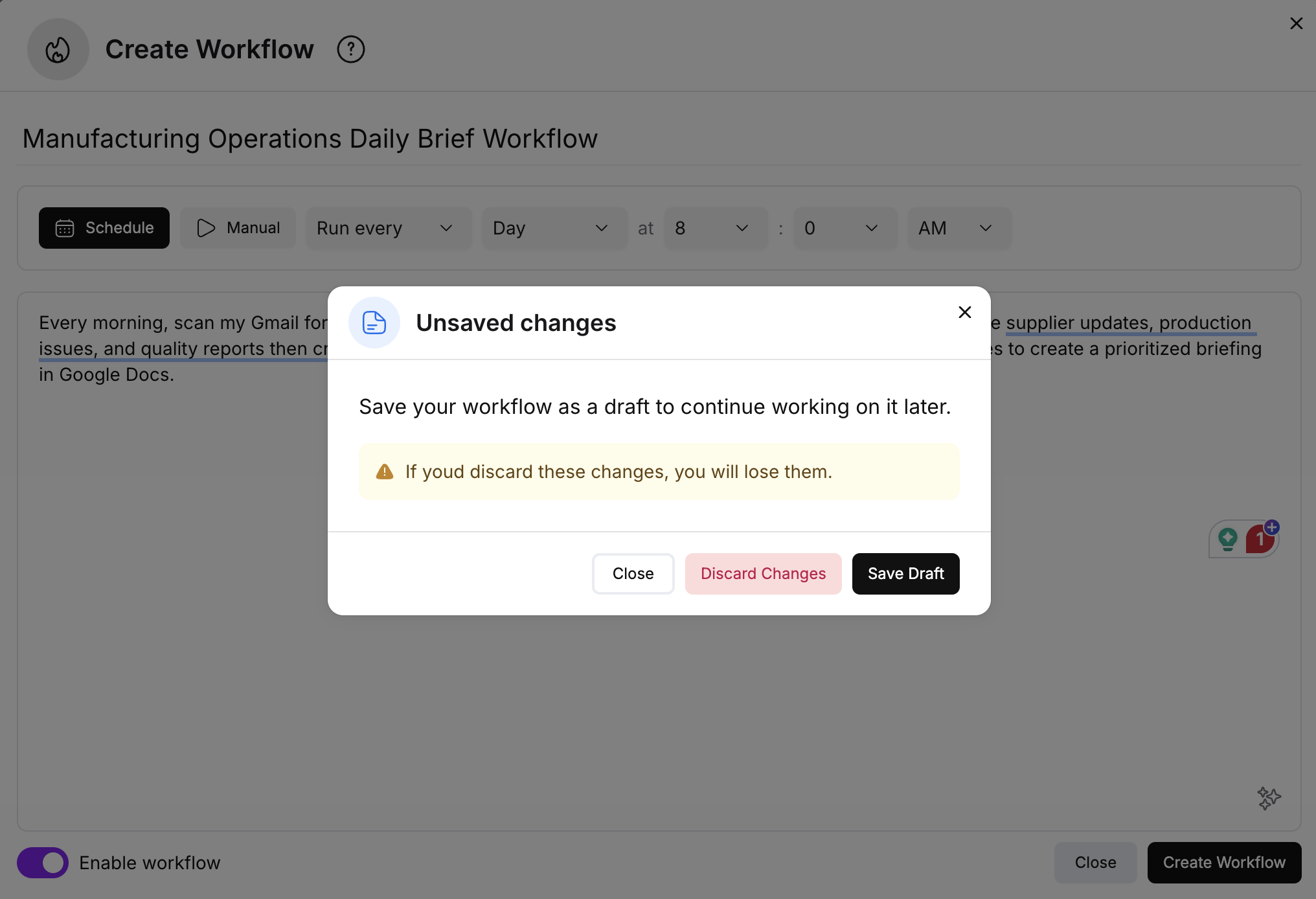
You will no longer lose your progress when building automations. We've added Drafts, allowing you to save unfinished workflow prompts and return to them later. We also improved the modal behavior to prevent accidental closures. For new users, the sample library now includes highlighted templates and category filtering to help you find the right starting point faster.

Pam workflow drafts feature showing unsaved changes dialog with options to save draft, discard changes, or close

Expanded Integrations

We've upgraded our integration architecture to support services requiring complex configurations. This opens the door to a wider range of tools, enabling new connections to services like Telegram and DocuSign.

Improvements

  • AuthAdded support for LinkedIn Sign-in/Sign-up. If you use the same email, your accounts will link automatically.
  • UXRedesigned the sidebar for better navigation and organization.
  • UXAdded a "scroll-down" button to jump to the bottom of long chat threads easily.
  • UXIntroduced a new Suggestions window to help discover capabilities.
  • UXAdded an interactive chat logo for a more responsive visual experience.
Jan 12, 2026
January 12, 2026

The Thoughts Box

The Thoughts Box

We've introduced a new way to see how Pam arrives at her answers. When you send a message, Pam now documents her reasoning and logic inside a dedicated "Thoughts" component. This keeps your main conversation clean by showing only the final response, while letting you peek under the hood when you need to verify her process.

The Thoughts Box - Pam's reasoning and logic

Workflow Samples

Getting started with automation is now easier. You can now browse and create workflows from a library of samples. To ensure a smooth setup, the system will automatically verify that all necessary integrations are connected before deploying the workflow.

Workflow Samples - Browse and create workflows from a library of samples

Centralized Conversation Management

We've launched a new Chats page that provides a single home for every conversation you've had with Pam. The new page includes full-text search, allowing you to quickly locate specific information or past discussions across your entire history.

Memory & Preferences

Pam is now more personalized. By integrating with our new memory system, Pam can learn and utilize your specific preferences over time. This ensures that her responses and actions align with your preferred style and requirements without needing constant reminders.

Improvements

  • BillingImplemented a new Credits system. All messages are now tracked against a credit balance.
  • OnboardingEvery new user now receives 10 free credits upon registration to explore the platform.
  • Credits UIAdded a new modal window where you can monitor your remaining credit balance in real-time.
  • IntegrationsOverhauled the integration flow to make connecting third-party tools simpler and more reliable.
Dec 20, 2025
December 20, 2025

Memory Visualization

Memory Visualization

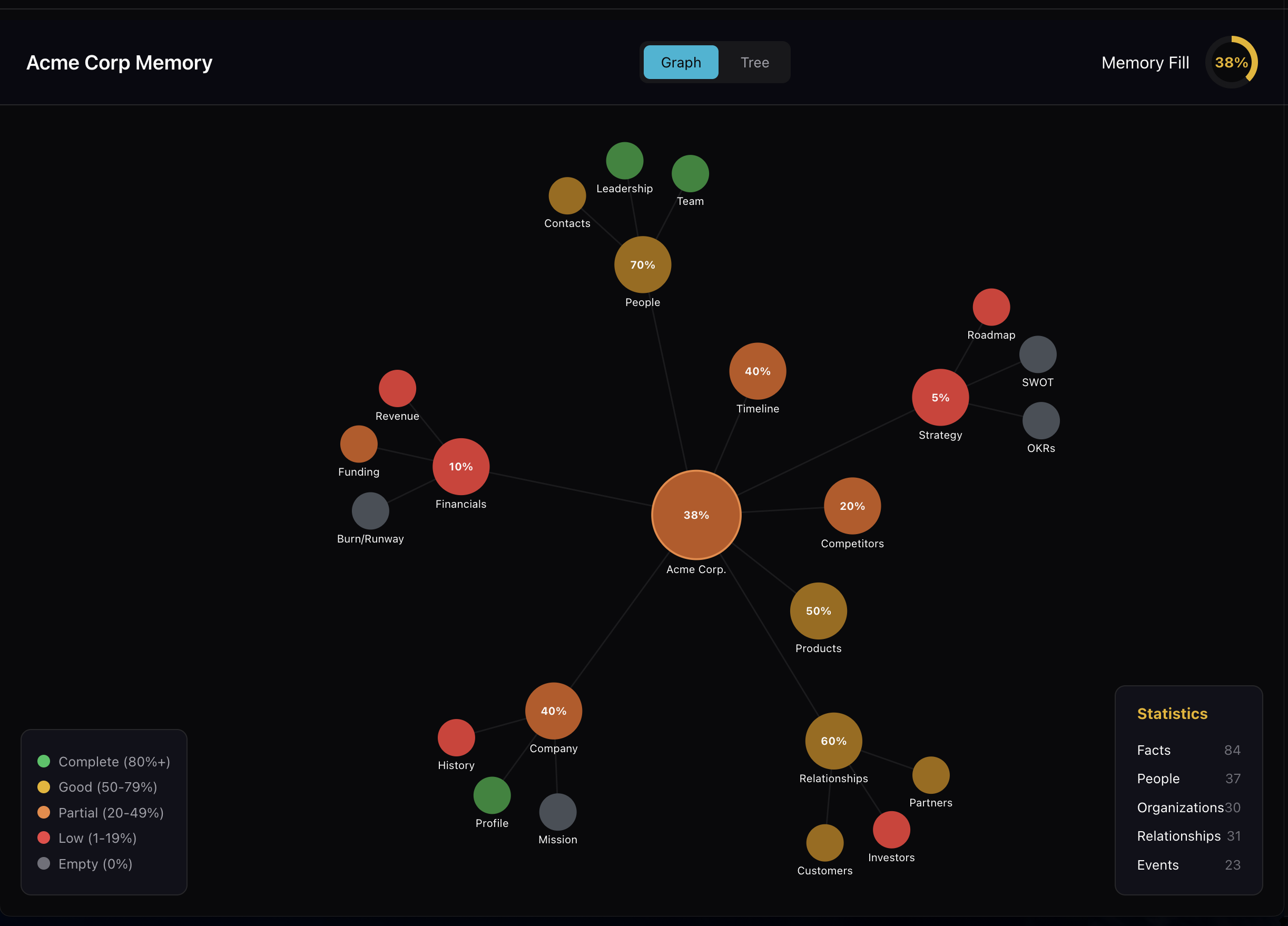
This update includes an early version of our memory visualization tools. Users can now access a Knowledge Graph to see how data is connected within the system, alongside a new interface dedicated to managing memory-based questions.

Memory Visualization - Knowledge Graph showing connected business data with completion percentages

Integration Controls

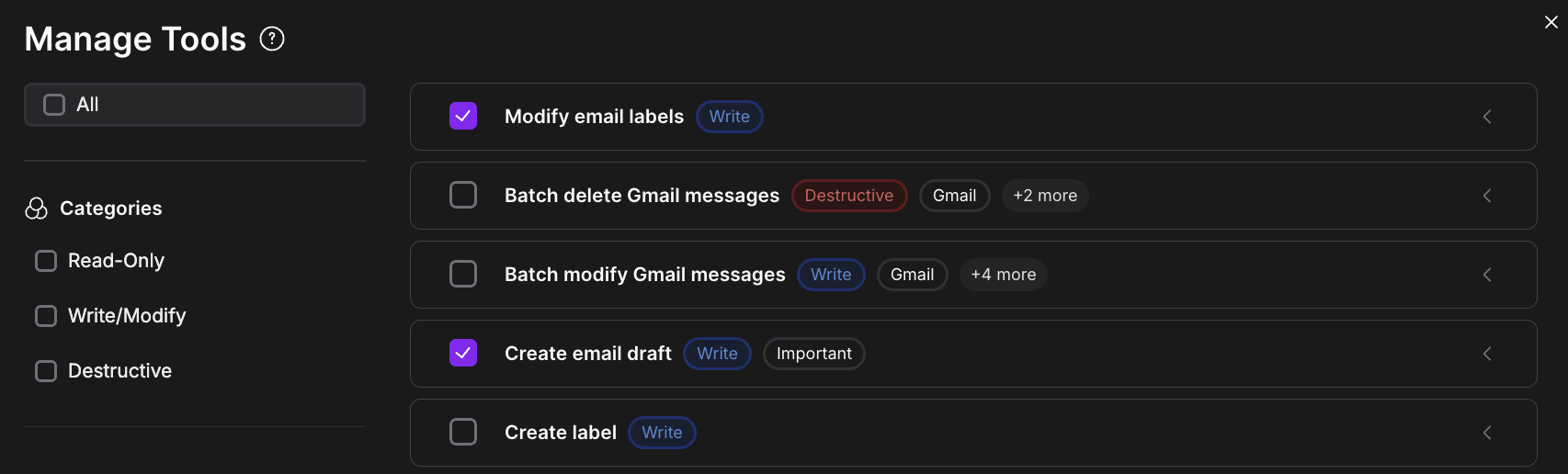
We have introduced fine-grained controls for integrations. Instead of granting broad access, you can now toggle specific actions on or off directly from the settings menu. For example, you can enable email reading while keeping email sending disabled. We also updated the chat interface to handle restricted actions more gracefully, providing clear prompts if an action requires additional approval.

Manage Tools interface showing fine-grained integration permission controls

Chat Improvements

New conversations start faster. We implemented a warm-up mechanism that significantly reduces the latency of the first message. Additionally, conversations now feature automatic, context-aware titles that update in real-time as you type, making it easier to organize and find past threads.

Improvements

  • ChatRefactored context management to ensure more consistent responses.
  • ChatAdded execution time tracking for workflow conversations.
  • IntegrationsAdded a flow to request access to custom Harmix integrations.
  • IntegrationsAdded toast notifications and resend options when an action is restricted.
  • BillingLaunched a Credits System and token metrics to track usage and costs.
  • SidebarRedesigned the workflow execution view for better visibility.
  • ReliabilityUpdated database schemas and added service health monitoring.

Fixes

  • IntegrationsFixed a bug preventing Notion workspace connections.
  • IntegrationsResolved an issue where email drafts failed to display correctly.

Useful AI. Real value.

Get updates from Pam on practical AI use cases, product news, and what actually delivers. Enter your business email to receive updates from Pam. See our privacy policy for details. You can unsubscribe at any time.

Ask AI for a summary about Pam

resources

Blog

Newsletter

solutions

Manufacturing

Solo Entrepreneurs

company

Research

Trust Center

Privacy Policy

Terms of Service